The guide
A kata is a form you practice until it disappears.
Nine moves that humans and coding agents run against the ledger until they turn into habits. Every stop links into the documentation for exact commands and configuration.
-
Bind the workspace.
kata initwrites a small, secret-free.kata.tomlthat binds your repo, including every clone and worktree of it, to one kata project. Issue state lives in SQLite underKATA_HOME, so your code history stays clean of tracker churn.kata init --with-agentsalso drops kata's operating contract intoAGENTS.md/CLAUDE.md, andkata quickstartprints it on demand. Every agent that opens the repo already knows the form.bind once, resolve everywhere $ cd your-repo $ kata init --with-agents # .kata.toml written; commit it. clones and # worktrees now resolve to the same project $ kata quickstart # the agent contract, printed on demand -
Put the plan in the ledger.
Work that only exists in a conversation dies with the conversation. Search before creating, then create with an idempotency key so a retried run resumes instead of duplicating.
Structure goes in as data: children hang under a parent with
--parent, ordering lives in--blocksand--blocked-by, and context rides on--related.search, then create $ kata search "login race" --agent $ kata create "fix login race" \ --body "Double-submit in Safari callback." \ --idempotency-key "login-race-2026-05-31" \ --agent OK create abc4 $ kata create "add regression test" --parent abc4 --agent OK create d4ex -
Claim one issue. Loudly.
In a multi-agent workspace,
kata next --unownedapplies the shared priority rules and returns at most one candidate.kata claimtakes ownership, and fails if someone got there first. Treat the failure as a signal: runnextagain and take different work.A claim costs about 20ms end to end, so agents check and re-check constantly. The ledger stays truthful because staying truthful is cheap.
one issue, one owner $ kata next --unowned --agent OK next issue=abc4 priority=1 title="fix login race" $ kata claim abc4 --agent OK claim abc4 # another agent's claim on abc4 now fails — # it runs `next` again and takes different work -
Write notes the next session can use.
Before a long pause, a context compaction, or a handoff, record the decision, the partial attempt, and what remains in a comment on the issue, where the next actor will actually look.
Planning state is native:
kata scheduleparks work until a date,kata deadlinepresses without parking, and asomedayflag shelves an idea without losing it.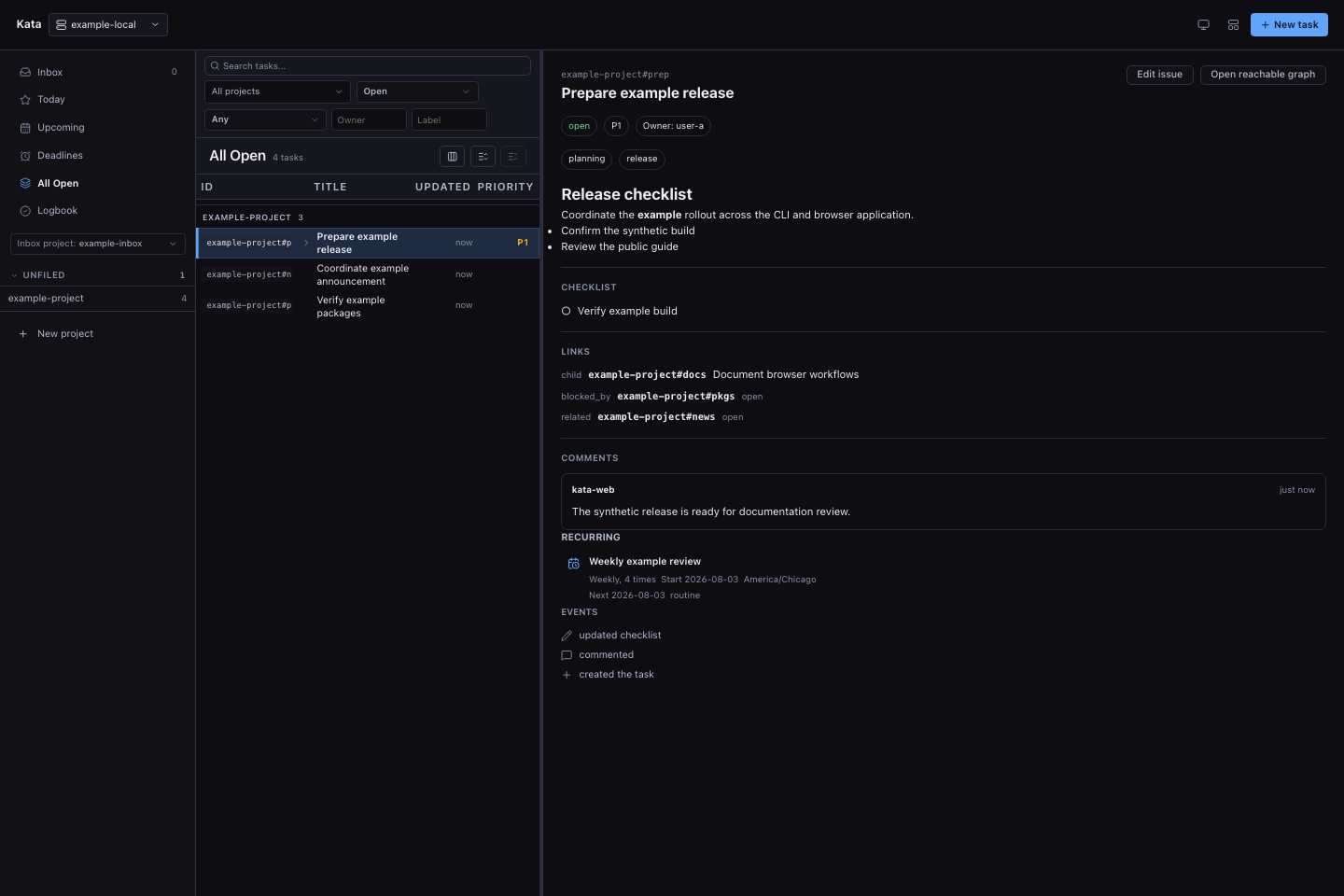
An issue is a document: Markdown body, properties, links, checklist, comments. Captures use synthetic data. -
Fan out, then join on the event stream.
An orchestrator, agent or human, creates child issues under a tracking parent and launches workers on their own branches. Workers claim, comment, and close against the same ledger. The orchestrator follows
kata events --tailand returns the moment a sub-task closes or needs a human.Every mutation lands on a durable, cursor-addressable stream, so a supervisor that was away replays exactly what it missed. Session hooks keep attention truthful: the ledger knows which issues have an agent on them right now.
Give workers distinct teammate handles to record their contributions under the coordinating actor. Use
kata notifyto request attention andkata inboxto read requests; clear each request after handling it. For a worker that should access only its assigned issue and descendants, create an expiring issue-scoped credential on a daemon in token identity mode.Agent orchestration · Event polling · Teammate requests · Worker credentials

-
Close only what you can prove.
Closing is a completion claim, and claims need evidence: real prose plus a commit, a test command, or typed evidence a reviewer can check later. Incomplete work gets a
needs-reviewlabel and an honest comment instead of a close.Close each issue as its work is verified, not in a batch at the end. The daemon refuses to close a parent over open children.
kata audit closeslets a reviewer replay anything that looks lazy, andkata reopenundoes it.a close is a claim $ kata close abc4 --done \ --message "Fixed the Safari double-submit; race test passes." \ --commit 4f2a91c --test "go test ./internal/auth/..." \ --agent OK close abc4 # not actually done? don't close: $ kata label add abc4 needs-review --comment "Fix drafted; flake persists in CI." --agent -
Steer from the terminal or the browser.
Everything the agents wrote is there for you to read, in the same ledger, with no export step.
kata tuikeeps triage in the terminal.kata uiopens the daemon's own browser workspace with projects, collections, editing, recurrences, and a relationship graph of how the work connects.The supervision surfaces read the same database the agents write, so there is nothing to sync and nothing to export.
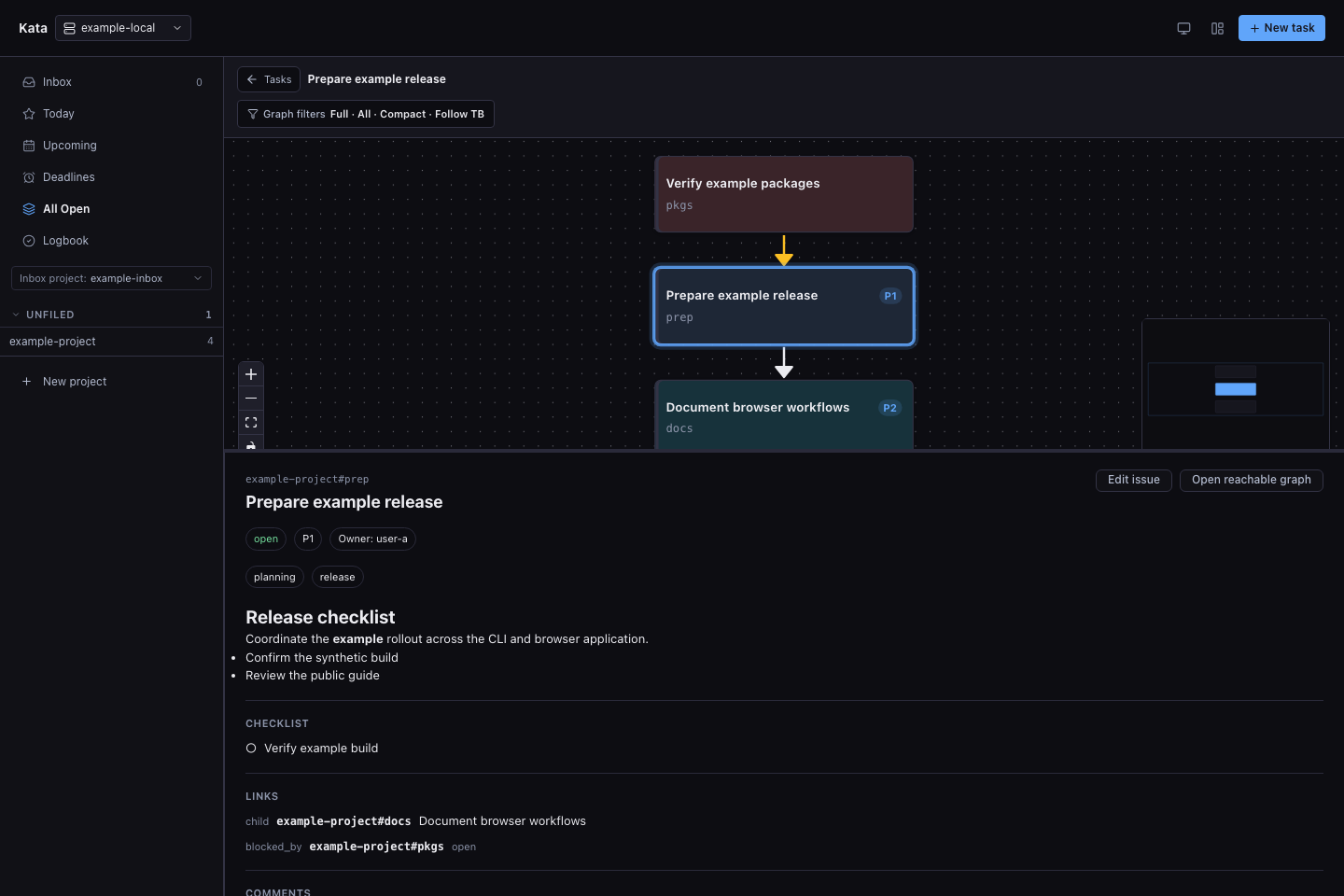
The relationship graph: the plan your agents built, drawn as one. -
Sync daemons, not keystrokes.
Federation keeps a team of agents in sync without giving up the local loop. Each machine runs its own daemon, and agents and humans only ever talk to the daemon beside them. Spoke daemons enroll with a hub and replicate shared projects in the background, so nobody's read ever waits on the network.
The other sharing models are just as deliberate: serve one daemon over a private network with bearer auth, mirror GitHub issues into the ledger, or run hosted behind
$PORT.
-
Own the ledger outright.
The whole record, issues, comments, events, and attribution alike, is a SQLite database under
KATA_HOMEon hardware you control.kata exportwrites it as JSONL for backup.kata importrestores or merges it anywhere, no vendor in the loop.kata is MIT-licensed, a single Go binary, and yours. The tracker your agents depend on shouldn't live behind someone else's API key.
your data, in the open $ kata export --output backups/kata-20260901.jsonl # the full ledger as JSONL: issues, comments, events $ kata import --input backups/kata-20260901.jsonl \ --target ~/.kata/restored.db # restored on any machine, no vendor in the loop
After the tour
Run the form until it's muscle memory.
Install kata, bind a repo, and let kata init --with-agents teach the loop to every agent that opens it. The documentation carries the exact commands, configuration, and architecture.