Web UI
Kata's Web UI is a browser client for the same daemon and issue data used by the CLI and TUI. It manages projects, issue collections, issue detail, relationships, recurrences, and configured daemons without adding a separate application server.
Open the application
From a bound workspace, run:
This starts or discovers the local daemon and opens its Inbox. Pass any issue
reference accepted by kata show to open that issue directly:
Kata resolves the reference before opening the browser, then uses the issue and
project UIDs in the URL so the bookmark survives project renames and issue
state changes. kata daemon status prints the same browser origin. See the
CLI reference for route and launch details.
Show, list, ready, and search results also include browser links when the
daemon serves a web UI. CLI JSON exposes web_url, and MCP includes the link
in issue summaries. Daemons without a browser UI omit it.
Release binaries contain the browser assets. A binary installed with
go install does not, because that path does not run the browser build; use a
release or make install when you need kata ui.
Embedding applications can serve the browser UI below a path such as
/tools/tasks/. Navigation, assets, sessions, API requests, and live updates
stay below that path. Hosts configure this through
Service.HandlerAt;
the standalone kata ui command keeps its existing route.
Navigate projects and collections
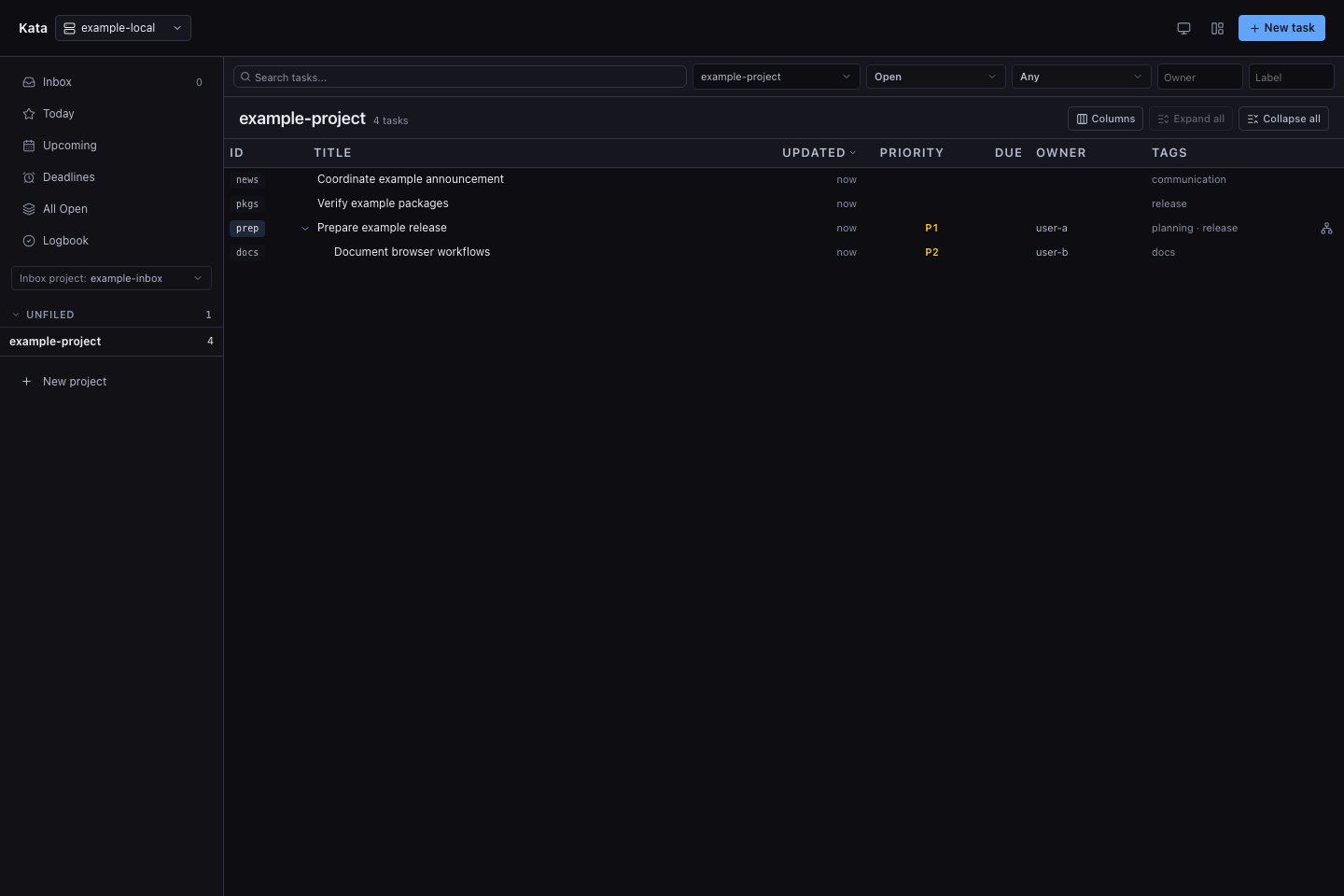
The sidebar lists Inbox, Today, Delegated, and Scheduled, then individual projects:
- Inbox shows open tasks from every project. A task with a future
scheduled_onstays out of Inbox until that day; a deadline never hides it. Narrow Inbox to one project with the Project scope filter, and sort it from the column headers. New tasks are captured in the designated Inbox project; if none exists, the first new task asks you to choose one. To switch it later, select Change in the New task dialog. This is separate fromkata inbox, which reads attention requests for an actor or teammate. - Today shows tasks whose start date or deadline has arrived.
- Delegated groups open teammate work by its
author/teammateattribution. - Scheduled is the agenda of every open task with a start date or deadline: missed deadlines under Overdue, actionable tasks under Today, then one group per future date.
- All Open and Logbook remain available as bookmarkable views for active and completed work.
- Project entries scope the collection to one project. Projects without an
areaare listed under Projects. New project creates a daemon project without changing any workspace files.
The collection toolbar filters by text, project, status, relationship, owner, and label. Parent and child issues can be expanded inline, and the column picker controls the visible fields. Collection, scope, filter, and selected-issue state stays in the URL, making the current view bookmarkable.
At narrow window widths the task list stays primary: below 700px the sidebar moves into a drawer, and filter controls wrap to fit the list pane, including side-by-side detail layouts.
Manage an issue
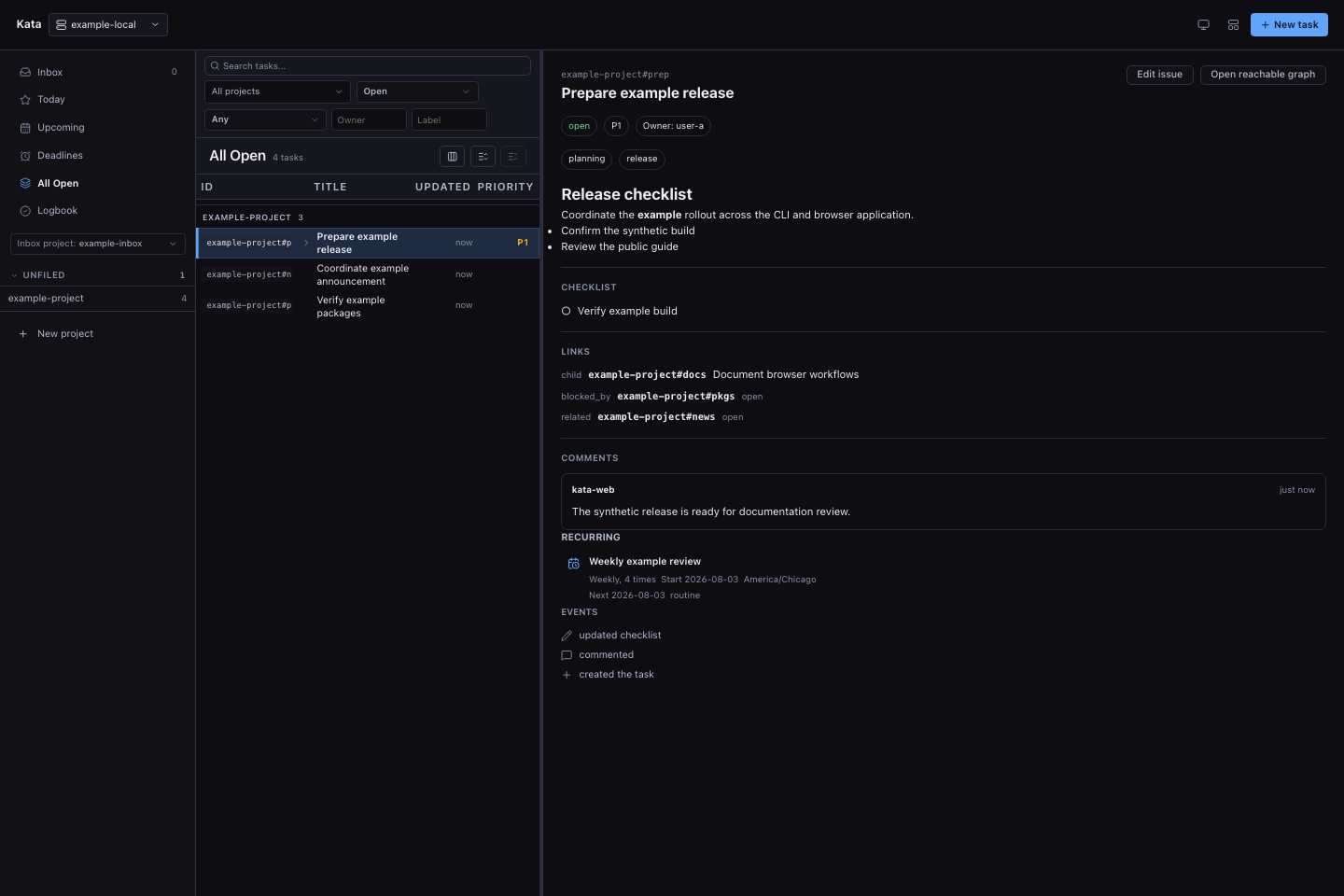
Select an issue to open its detail panel. The panel opens as a read-only view of the description, properties, checklist, links, comments, recurrence, and events, with Markdown rendered in the description and comments. Status, priority, owner, dates, and labels sit in the header beside the actions. Each event shows when it happened, and parent, child, and linked issue references open that issue. Edit issue switches the panel to the editor, which can update the title, description, schedule, due date, owner, priority, labels, and project, and Done editing returns to the read-only view. The editor also supports:
- starting or renewing a temporary assignment from the Assignment control; both views show its absolute expiry;
- adding, completing, and removing checklist items;
- adding comments with issue-reference completion;
- adding related links and navigating or filtering existing parent, child, blocking, blocked-by, and related links;
- completing, reopening, moving, and deleting issues; and
- creating, editing, or deleting the issue's recurrence.
When a close saved a closing-session reference, the issue's events show the agent and session ID, linked when a URL was saved.
With daemon API 0.28.0 or newer, comments show handles, reply targets,
backlinks, and edit markers. Select a reply target or backlink to open its issue
and focus the linked comment. Reply, Confirm, Refute, and
Supersede open a typed reply composer from the read view. An unchanged
retry keeps its request identity; a duplicate refusal offers an explicit force
action. See the comment rules for
validation and handle syntax.
When the editor pane is narrower than 640 pixels, the title appears above the actions so it remains readable.
Mutations use the same daemon validation, actor attribution, revision checks, events, and hooks as the CLI. Controls are disabled while authority is stale, read-only, or another mutation is pending.
Explore relationships
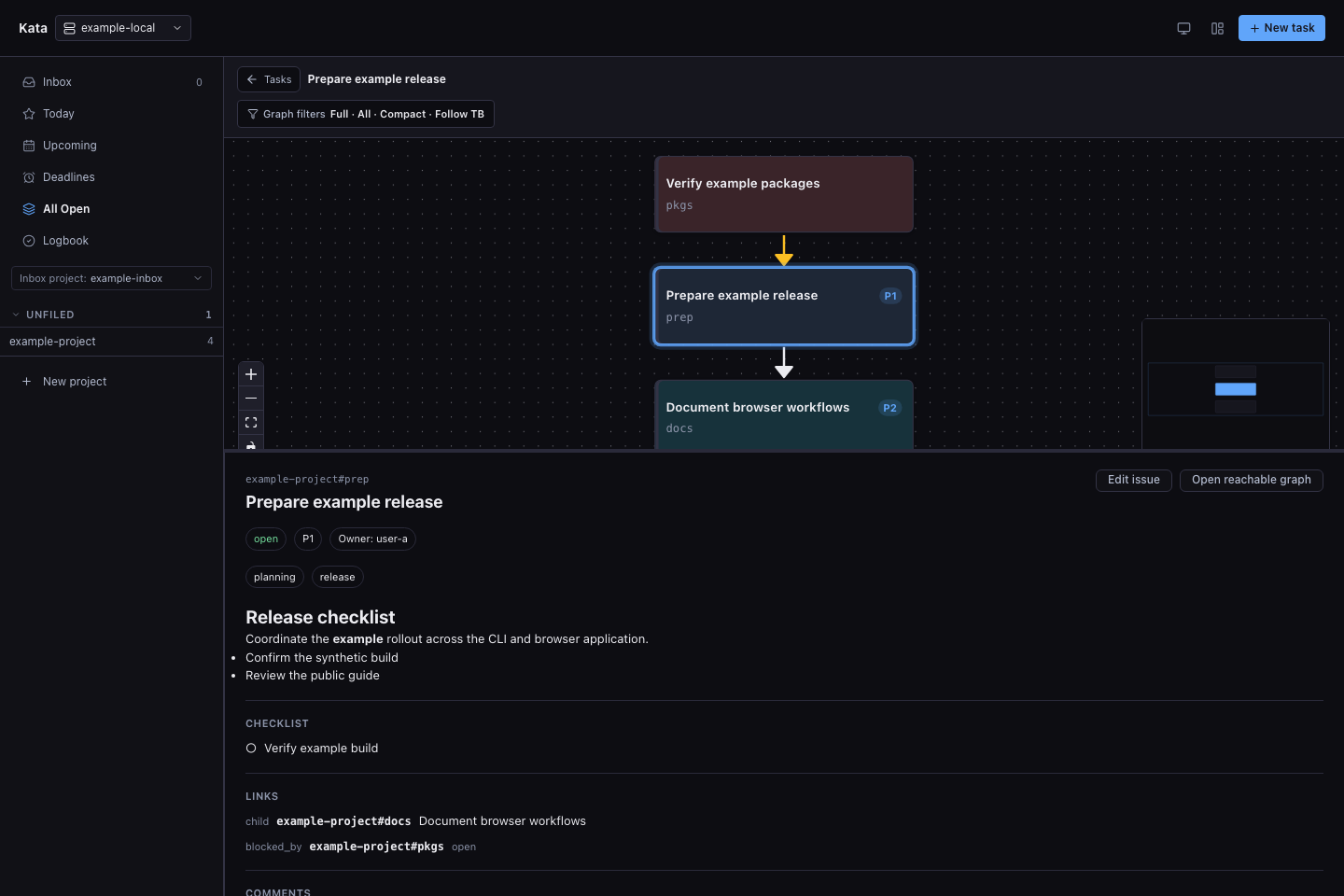
Open the graph action from an issue to see the reachable relationship graph. The selected issue stays anchored while the graph shows parents, children, blocking dependencies, and related issues. Graph filters choose the link types, direction, and traversal depth; selecting a node opens its issue detail.
Work across daemons
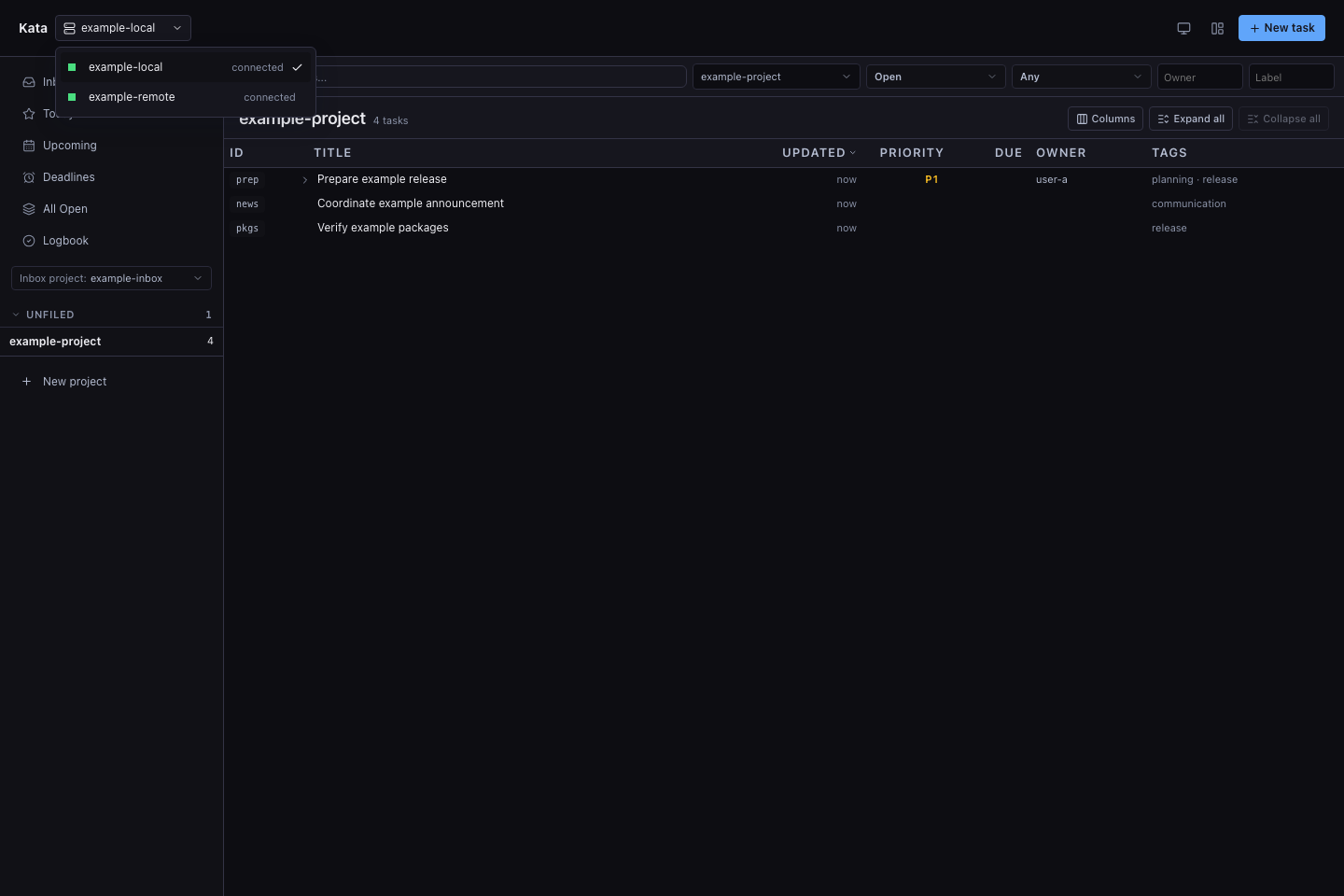
A plain kata ui opens the local browser gateway. When
<KATA_HOME>/config.toml contains [[daemon]] entries, the daemon switcher can
move among them without leaving that browser origin. Configured bearer tokens
remain server-side, and the application remembers the active route separately
for each daemon.
Project visibility can limit the switcher. If team visibility hides at least one project from your account, or your token is limited to an issue subtree, the switcher lists only the local daemon. Configured target tokens do not carry your project limits, so the gateway refuses to use them for you. If you can see every project, or you are signed in as the daemon owner, the switcher lists every configured daemon. See Project access for the exact rules.
Use kata ui --daemon <name> when you want to open one configured target
directly instead. See Configuration
for catalog settings and Remote daemon for
network, authentication, and proxy setup.
Check the current connection
The yellow summary at the top shows the active hub, account, and credential status. It stays visible while you navigate and wraps on narrow screens. The TUI shows the same information in its existing header row.
Account-bound credentials show their canonical actor. A connection without an account identity shows how it authenticated instead:
| Connection | Account label |
|---|---|
| Owner-local socket or direct loopback browser tab | Local connection |
Shared [auth].token daemon token |
Shared daemon token |
| Bootstrap token in token-identity mode | Bootstrap token |
--insecure-readonly anonymous reader |
Anonymous (read-only) |
| Tokenless private-network writes | Unauthenticated private network |
| Trusted proxy request without an asserted actor | Proxy without account |
Switching daemons or losing current authority clears the previous account while reconnection is pending. Finite credentials show Credential expired when their lifetime ends. These summaries never show token values and do not load the administrator credential inventory.
Audit provisioned credentials
An administrator session can open Credentials to inspect the daemon's read-only credential ledger. The screen keeps live, expired, and revoked rows, shows their actor, name, issue-subtree scope, and lifecycle timestamps, and can be filtered without sending credential metadata to browser storage. Last observed use is best-effort rather than a request-by-request access log. The screen never receives a bearer value, token hash, or provisioned token-file path.
The navigation entry appears only when the daemon advertises
token_audit_read. That capability is deliberately separate from ordinary
issue write access: a bootstrap/static administrator can audit credentials even
when its browser session cannot mutate issues, while a normal local-web,
identity-token, scoped-worker, or proxy session cannot inspect them. Switching
through the local daemon gateway cannot borrow a target's configured credential
to gain this view.
Original comments show nonzero incoming counts for Replies, Confirmations,
Refutations, and Superseding replies. Activate a kind to inspect each visible
reply's author, time, and evidence, then open its handle. Return to original
comment restores focus to the source. Conflicting assertions remain visible;
superseding replies do not hide the original body. Each kind includes up to 50
of its newest visible incoming replies, in chronological order. Partial evidence uses a +
count and a “More replies may be available” notice. A target edited after a
reply is marked on that reply and in its incoming evidence list.
Browser authority and deployment
The default local experience is intentionally simple: a browser connecting directly to the daemon's loopback listener receives a tab-scoped local session. The mint requires the exact listener Host and normally the exact Origin. An embedded owner-local browser may omit or send an empty Origin only on this direct-loopback mint; cross-site Fetch Metadata, forwarded requests, and non-loopback peers remain rejected. Browser requests combine the resulting tab-local credential with an HttpOnly instance cookie, and later mutations also require exact-origin CSRF validation. Restarting the daemon invalidates its browser sessions.
Non-loopback, identity-authenticated, or proxied deployments do not receive
local-web authority automatically. They require the configured login mechanism
and an exact public origin. A static daemon token does not disable the direct
loopback session, so kata ui remains local and passwordless when that token is
also used by API clients. Plain HTTP outside loopback is limited to an explicitly
trusted private network; otherwise terminate HTTPS at the same origin.
--insecure-readonly can serve an anonymous browser but never grants mutation
authority.
The Web UI exposes ordinary issue and project workflows plus the capability- gated, read-only credential ledger. It does not create or revoke tokens and does not expose federation, integration, purge, or owner-filesystem administration. For the full boundary and reverse-proxy requirements, see Remote daemon and the HTTP API browser-session reference.