---
title: kata カタ documentation
description: Documentation for kata, the local-first issue tracker for humans and coding agents.
---
# kata documentation
kata カタ is a local-first issue tracker for coding agents and the humans
steering them: a task ledger agents drive from the CLI and humans supervise in
the terminal or browser. This is the operating documentation; for the product
story, start at the [overview](https://katatracker.com/) and the
[guide](https://katatracker.com/guide/).
```sh { .kata-install-command data-install-platform-content="macos" }
brew install kata
```
```sh { .kata-install-command .kata-install-command--fallback-hidden data-install-platform-content="linux" hidden="hidden" }
curl -fsSL https://katatracker.com/install.sh | bash
```
```powershell { .kata-install-command .kata-install-command--fallback-hidden data-install-platform-content="windows" hidden="hidden" }
powershell -ExecutionPolicy ByPass -c "irm https://katatracker.com/install.ps1 | iex"
```
## Quickstart
```sh
cd your-repo
kata init # bind this workspace to a kata project
kata create "fix login race" # prints a short id, e.g. abc4
kata list # see open work
# close only when the work is verified
kata close abc4 --done \
--message "Fixed the login race; tests pass." --commit
kata tui # browse and triage interactively
kata ui # open the browser application
```
`kata create` prints each issue's short id; use it in later commands. Working
with coding agents? `kata init --with-agents` drops kata's operating contract
into `AGENTS.md`/`CLAUDE.md`, and `kata quickstart` prints the full agent
contract. See the [Quickstart](get-started/quickstart.md) for the complete
walkthrough.
## Two ways to supervise

`kata tui` keeps triage in the terminal. `kata ui` opens the same ledger in a
full browser workspace:
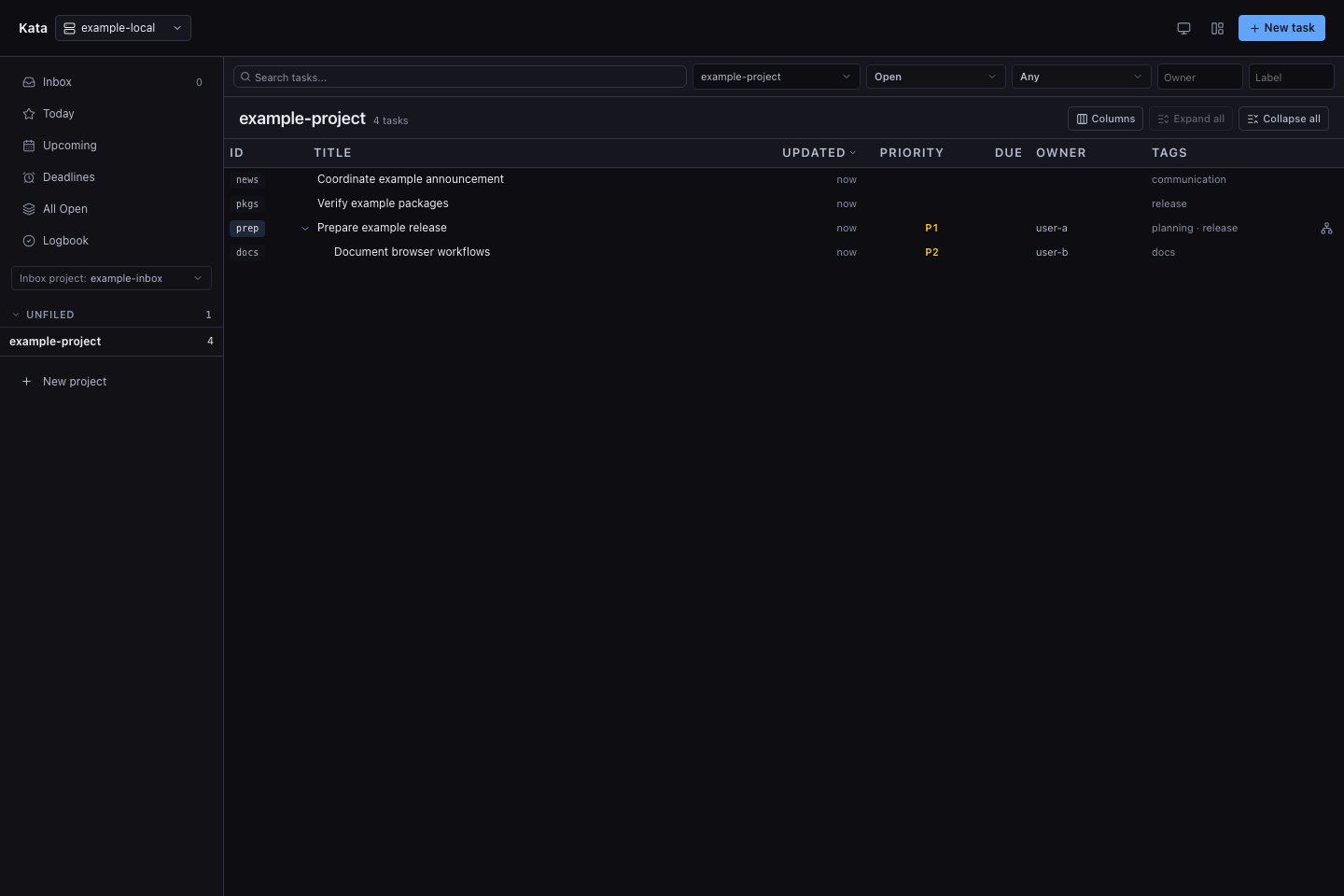
Both images are generated from disposable synthetic data by the docs screenshot
workflow. See the [Web UI guide](guide/web-ui.md) for projects, collections,
issue editing, relationships, recurrences, and configured-daemon switching.
## How it works
The `kata` CLI resolves a project from your workspace, `.kata.toml`, or
`--project`, then talks to a local daemon, starting one automatically when
needed. The daemon owns a SQLite database under `KATA_HOME`, applies mutations,
and records an event stream that both the CLI/TUI and hooks read. Search is
lexical by default and can opt into [semantic search](guide/semantic-search.md)
with a local or hosted OpenAI-compatible embeddings endpoint. Optional
[GitHub sync](operations/github-sync.md) can mirror upstream GitHub issues into
kata, and federation can replicate selected projects through a hub. Your repo
commits only the small `.kata.toml` binding, so issue history stays out of code
history. Private-network remote daemon modes are explicit: operators can use
bearer auth on trusted private HTTP or opt a single-user private IP into
tokenless writes. See [Concepts](guide/concepts.md) and
[Architecture](design/architecture.md) for the full model.
Go applications can also run kata in-process through the listener-free
`go.kenn.io/kata` service. The host application mounts the same HTTP API and
owns the listener, authentication boundary, and process lifecycle; see
[Embedding kata in Go](development/embedding.md).
## When to use kata
Reach for kata when work should stay close to the machine doing it:
- coding agents need to discover, claim, update, and close work from the CLI;
- you want an instant terminal loop instead of a browser session;
- work spans local clones, worktrees, experiments, or non-git directories;
- task state should survive chat compaction without becoming a markdown plan;
- closes should carry evidence and an audit trail.
kata is not a SaaS issue tracker. Linear, Jira, GitHub Issues, and ClickUp are
shared online systems for roadmaps, dashboards, and cross-team reporting; kata
is a local ledger for the work itself. They coexist. See
[Comparisons](guide/comparisons.md) for the trade-offs.
## Next steps
- [__Concepts__](guide/concepts.md). The data model and how the pieces fit.
- [__Web UI__](guide/web-ui.md). Manage projects and issues in the browser.
- [__CLI reference__](reference/cli.md). Every command and flag.
- [__Model Context Protocol__](reference/mcp.md). Connect an MCP client over
stdio or Streamable HTTP to the workspace project, a fixed allowlist, or
the whole daemon.
- [__Semantic search__](guide/semantic-search.md). Improve issue discovery
with opt-in embeddings.
- [__GitHub sync__](operations/github-sync.md). Bring GitHub issues into kata.
- [__Agent workflows__](workflows/agents.md). The operating contract for agents.
- [__Comparisons__](guide/comparisons.md). kata vs. SaaS issue trackers.